
How to use AI tools for small businesses in 2026
Let’s face facts… AI is daunting at best. Platforms and agents are showing up on the landscape on a daily basis. And if you operate a small business, do you really have time to ferret through the choices, and make decisions on what can truly impact your business? Well our friends at GoDaddy have put together a guide to the most effective ways to integrate AI into your business and possible alternative products to use. Read on and learn it… before your competition does.

FROM GO DADDY / BY JULIET DREAMHUNTER
AI tools for small businesses are software applications that automate tasks, generate content, analyze data, and streamline day-to-day operations. They can simplify repetitive work so you can focus your energy on serving customers and growing your business.
However, a long list of AI tools doesn't make choosing easier. This guide goes beyond a flat tool roundup to help you identify the right place to start, the order to add AI tools, and a realistic budget based on your biggest bottleneck and business size.
Why most "best AI tools" lists don't help you choose
Most small business AI tool lists provide the same popular platform names, like ChatGPT, Claude, Perplexity, Notion, Canva, and Fireflies. That can be useful, but it doesn’t answer the question that matters most: Which two or three AI solutions fit your business right now? A design-heavy business, a service business, and a growing online store won’t face the same challenges, so they shouldn’t start with the same tools.
Let’s take a deep dive into how to choose the right AI tools for your small business before exploring solutions to consider using in 2026 and beyond.
Find the right AI tool for your biggest business challenge
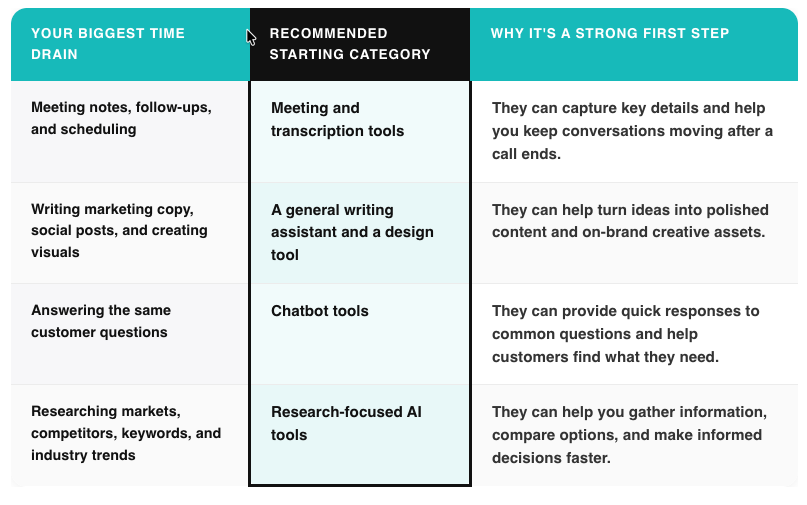
Before picking an AI tool, figure out which tasks consistently take up too much of your day. The platform you start with should reduce a clear, repeatable bottleneck, not just add another platform to manage. For example:
Meetings and admin
You’re spending hours writing follow-up notes after every call, trying to remember action items, or juggling a calendar full of meetings. Meeting and transcription tools are a practical place to start because they can help capture conversations and keep next steps organized, meetings, transcription, and communication section for tools that can support this part of your workflow.
Content and marketing
Writing website copy, social posts, emails, and campaign ideas can pull attention away from the work that keeps your business running. Begin with a general writing assistant for words and a design tool for visuals, then integrate them into your existing marketing process. The writing and design sections ahead will help you find options for each task.
Customer service
Answering repetitive customer questions can take up a surprising amount of time, especially as your business grows. An AI-powered chatbot can help customers get quick answers to common questions while giving your team more room to focus on conversations that need a personal touch. See the customer service section for ideas on getting started.
Research and decision-making
Market research, competitor analysis, keyword research, and industry trends can all be valuable, but gathering that information manually takes time. A research-focused AI tool can help you find, organize, and compare information faster. Head to the research and SEO section to explore tools that can support better business decisions.
The best AI tools for small business owners
The AI tools below are grouped by the work they can help your business do. Jump to the category that matches your most pressing need, then choose one tool to test before adding another.
Once you’ve nailed down and mastered the best AI solution for your small business, you can turn it into a complete business tool.
AI assistants for writing, brainstorming, and everyday business work
AI assistants help you draft, revise, organize, and think through everyday business tasks using natural-language prompts.
ChatGPT: Best for fast first drafts, brainstorming, outlining, and pressure-testing business decisions with a thinking partner.
Claude: Best for working through long documents and nuanced writing, especially after you share your business context before requesting an output.
Copy.ai: Best for creating marketing-focused copy, including product descriptions, social posts, and sales materials.
WordHero: Best for generating a variety of short-form business content from simple prompts.
Jasper: Best for teams that need a brand-focused writing workflow across marketing channels.
Grammarly: Best for polishing grammar, clarity, tone, and professionalism in existing writing.
These tools work best when you give them context like brand tone, audience, products or services, goals, and any details that should guide the output upfront. Save a simple business brief to reuse in prompts, so you don’t have to start every conversation from scratch.
Consider these platforms if writing or planning creates a recurring bottleneck. You can wait if your business already has a reliable process for creating content and communicating internally.
Build it into a business tool: Airo AI Builder can help you turn an idea into a customized web app. Consider creating a market-validation workspace that organizes customer feedback and competitor findings, or a member portal that delivers AI education and resources to clients.
AI tools for marketing and content creation
AI marketing and content tools help you create visual, video, audio, and photo assets that support your brand across channels.
Visual and graphic tools
Midjourney: Best for creating stylized, prompt-based images and visual concepts.
GoDaddy Logo Maker: Best for creating a professional logo and brand assets for a new or growing business.
LogoAI: Best for generating logo concepts and supporting brand materials.
Video tools
Pictory: Best for turning written content into short, shareable videos.
Runway: Best for experimenting with AI-generated video and editing features.
Synthesia: Best for creating presenter-led videos without filming a person on camera.
Audio tools
Adobe Podcast AI: Best for enhancing spoken audio and improving podcast or video recordings.
Murf: Best for creating AI voiceovers for videos, presentations, and explainers.
Auphonic: Best for automatically balancing and cleaning up recorded audio.
Photo tools
Adobe Photoshop: Best for advanced photo editing with AI-assisted features.
Fotor: Best for quick image edits, background changes, and simple design work.
Pixlr: Best for browser-based photo editing and quick visual updates.
Consider these first if creating consistent marketing assets slows down your campaigns or prevents you from showing up regularly online. You can wait if your main challenge is operational, customer-facing, or administrative work.
Build it into a business tool: Airo AI Builder can help you create a local business booking and lead-qualification app that gives potential customers a clear path from your marketing content to an inquiry or appointment.
AI tools for customer service and chatbots
AI chatbots help customers get answers, complete simple tasks, or reach the right person through an automated conversation.
GoDaddy Conversations: Best for managing customer messages and keeping business communications organized in one place.
Zendesk: Best for businesses that need AI support features within a larger customer service system.
HubSpot Chatbot Builder: Best for connecting chatbot conversations with marketing, sales, and customer data.
Chatfuel: Best for building automated chat experiences for messaging channels.
Zapier AI Chatbot: Best for creating a chatbot that can connect with information and workflows across other business tools.
These solutions are a good place to start if your team spends significant time answering the same customer questions. They may not be worth prioritizing if you only receive a small number of customer inquiries or still need to define your most common support questions.
Build it into a business tool to create an ecommerce customer self-service hub where shoppers can find answers about products, orders, shipping, and returns without contacting your team.
AI tools for meetings, transcription, and communication
AI meeting and communication tools capture conversations, organize key points, and help turn discussions into clear next steps. You can choose between transcription tools to create a written record and summary after a meeting, and dictation tools that turn speech into text as you talk.
Fireflies.ai and Otter.ai: Best for recording, transcribing, and summarizing meetings.
CastMagic: Best for turning recordings into meeting notes, follow-up content, and other written assets.
Writesonic: Best for drafting communications, summaries, and business content.
Reflect: Best for organizing notes, ideas, and meeting takeaways in a personal knowledge workspace.
Granola and Fathom: Best for meeting intelligence, including notes, summaries, and action items.
Wispr Flow: Best for dictating messages, notes, and drafts in real time.
This category makes sense for business owners whose meetings, notes, and follow-ups regularly fall behind. If you don’t hold regular meetings or take notes often, you may not need these tools yet.
AI tools for operations, productivity, and automation
AI operations tools help you manage projects, create internal resources, handle routine tasks, and connect the systems your business already uses. Some tools have a single purpose, such as email generators and slide-deck creators, while connective tools are designed for automated, multi-step workflows.
ClickUp AI and Asana: Best for organizing projects, assigning tasks, and keeping work visible across a team.
Notion AI: Best for managing internal knowledge, drafting documents, and finding information across a workspace.
Rytr, Flowrite, HyperWrite, Quickmail, and NanoNets: Best for drafting emails, streamlining outreach, and handling document-based tasks.
SlidesAI, DeckRobot, MagicSlides, Presentations.ai, and Dropdeck: Best for turning outlines and notes into presentation decks.
Zapier: Best for connecting business apps and automating repeatable workflows between them.
MindStudio: Best for building no-code AI workflows that can support more customized business processes.
Prioritize this category when manual handoffs, scattered information, or repetitive processes are slowing down your team. If your tasks vary widely from day-to-day, these tools may not be the best fit.
AI tools for research, SEO, and competitor analysis
AI research and SEO tools help you find information, identify search opportunities, monitor visibility, and turn findings into useful business decisions.
SurferSEO: Best for optimizing content around keywords and on-page SEO recommendations.
SEO.ai: Best for supporting keyword research, content planning, and SEO-focused writing.
Frase: Best for researching search results and creating content briefs.
Pro Rank Tracker: Best for monitoring keyword rankings over time.
Scalenut: Best for planning, writing, and optimizing SEO content.
Perplexity and NotebookLM: Best for research that goes beyond keyword data and ranking reports.
SEO-focused tools concentrate on keyword research, content optimization, and ranking analysis. General research solutions can provide sourced, cited answers for faster external research or uncover patterns across your business’s own recordings and documents.
Choose this category when you need stronger insight into what your audience searches for, what competitors are doing, or what your own business information reveals. You may not need these AI tools yet if you’re just starting out.
Build it into a business tool: Airo AI Builder can help you create a business idea and market-validation app that brings competitor research, customer insights, and demand signals into one place.
AI tools for data analysis and business insights
AI data-analysis tools help you identify patterns in business information that can be difficult to spot in spreadsheets, reports, and customer feedback. A retailer, for example, could analyze sales patterns alongside customer comments to see that demand for a product is rising in a particular season, or that dissatisfaction with shipping is beginning to affect repeat purchases.
Catching signals like these early can help owners adjust inventory, messaging, or service before a trend becomes a larger problem.
Profound: Best for monitoring how your brand appears in AI search results and discovering related visibility opportunities.
RapidMiner: Best for analyzing larger data sets and building predictive models.
MonkeyLearn: Best for sorting and analyzing text data, including reviews, surveys, and support messages.
DataRobot: Best for teams that need advanced predictive analytics and automated machine-learning workflows.
Akkio: Best for creating accessible forecasts and data insights without needing deep technical expertise.
This category is a good fit once your business has enough sales, customer, or operational data to make analysis useful. If you haven’t collected much data yet, you may want to hold off on these AI-powered platforms.
Build it into a business tool to create a financial dashboard that organizes important business data and supports planning for different growth scenarios.
AI tools for websites and online businesses
AI website tools help you create and manage an online presence, including site copy, product descriptions, and customer-facing web experiences.
Airo AI Builder can help you create a customized website or web app through a guided conversation, then generate relevant site copy and product descriptions to help you get online faster. Pair it with GoDaddy’s business name generator when you’re still shaping your brand and need ideas for a name that fits your business.
This is a great AI tool to start with if you’re still building your brand or online presence. It can also be helpful if you’re rebranding or redesigning your website.
AI tools built into the software you already use
Built-in AI features add drafting, search, summarization, and organization support directly inside the software your business relies on. Check the subscriptions you already pay for before signing up for another standalone AI tool. For example:
Microsoft 365 and Copilot: Best for businesses that want AI support within familiar productivity tools for documents, email, spreadsheets, and presentations.
Google Workspace with Gemini: Best for drafting, summarizing, and finding information across Google Workspace tools.
Slack AI: Best for summarizing channels, catching up on conversations, and finding answers in shared team knowledge.
Descript: Best for editing audio and video through a text-based workflow, including transcription and content cleanup.
Review your current tools, identify the features your team uses most, and test any included AI capabilities against a real task before expanding your software budget.
Build your tool stack by business stage, not by category
The right AI tool stack looks different for a solo founder, a small team, and a business handling more customers and complexity. Here are some general guidelines to help you budget:
The solo founder stack
A solo founder can usually stay productive with three or four tools and a rough monthly budget of $30 to $150. Prioritize one general assistant, such as ChatGPT or Claude, one design tool, and a website builder that makes it easy to create and update pages.
Add a meeting or admin tool, such as Fathom or Otter.ai, only if client calls happen often enough to create a follow-up burden. Only add a fifth tool when the first three are part of your daily workflow, and you can clearly name the problem the next tool will solve.
The small team stack (2–10 people)
A small team often needs four to six tools and a rough monthly budget of $150 to $750, depending on the number of users and plan levels. Keep a shared writing or research assistant, add a knowledge-management tool such as Notion AI, and use Zapier as an automation layer to connect recurring tasks across your tools.
Your existing software may already cover some of these needs. Learn how to use Microsoft 365 for small businesses before adding another productivity subscription.
The scaling business stack
A scaling business may need six or more connected tools and a rough monthly budget of $750 to $3,000 or more, depending on team size, customer volume, and integrations. Prioritize CRM-integrated AI tools, such as HubSpot’s AI features, and a no-code workflow builder such as MindStudio.
You may also want to consider building a custom app such as an ecommerce customer self-service hub, an automated back-office workflow tool, a financial dashboard, or a business idea and market-validation app. Explore more apps to build with AI for your business to identify a custom tool that fits the process your team needs to improve.
A 30-day plan for adopting your first AI tool
A useful AI tool should earn its place in your business. Use this 30-day plan to test one tool, measure its impact, and make a confident decision before adding more software.
Week 1: Pick one pain point
Identify one repetitive task that takes up the most time each week. It could be writing follow-up emails, creating social content, answering common customer questions, summarizing meetings, or researching competitors.
Choose a task that happens often enough to measure and has a clear outcome. Avoid trying to solve several problems at once. A focused first test will show you more than a broad experiment with multiple tools.
Week 2–3: Trial and measure
Use the AI tool’s free tier or trial period to test it on real work. Set one measurable goal before you begin, such as saving two hours each week on meeting notes, drafting five social posts in 30 minutes, or reducing the number of repetitive customer questions your team answers manually.
Keep a simple record of the time, effort, and quality of the results. Note what still requires human review, where the tool creates friction, and what prompts or processes produce the most useful output.
Week 4: Decide to scale or drop
Review your goal and decide if the AI tool delivered measurable value. Upgrade to a paid tier when it reliably saves time, improves a process, or helps your business deliver a better customer experience.
Drop the tool if it didn’t solve the original problem, required more effort than it saved, or produced results your team couldn’t use. Add a second tool only after the first one has become a reliable part of your workflow.
Build an AI toolkit that works for your business
AI works best when it supports the way you already do business, instead of forcing you to rebuild everything around a new tool. Pick a practical opportunity, test it with intention, and give yourself room to learn what fits.